
What is a Workbook?
A Workbook is a downloadable PDF containing all the lesson worksheets from a specific sequence and term. Instead of downloading worksheets one lesson at a time, you can now generate everything you need in one click.
How to Download a Workbook
-
Go to the Sequences tab from your top navigation bar.
-
From List View or Calendar View, locate the sequence you want. In List View, choose it from the drop-down at the top of the page.
-
Click the ⋮ menu on the right-hand side of the sequence name.
- In List View:
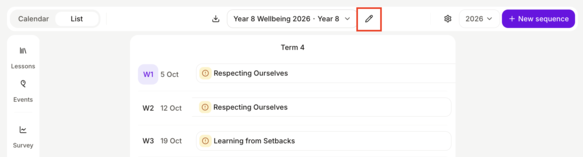
-
In Calendar:
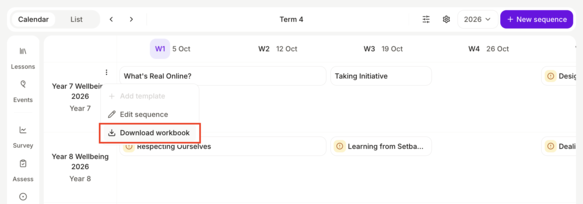
- In List View:
-
Select Download Workbook.
-
In the pop-up modal, choose the term you want worksheets for.
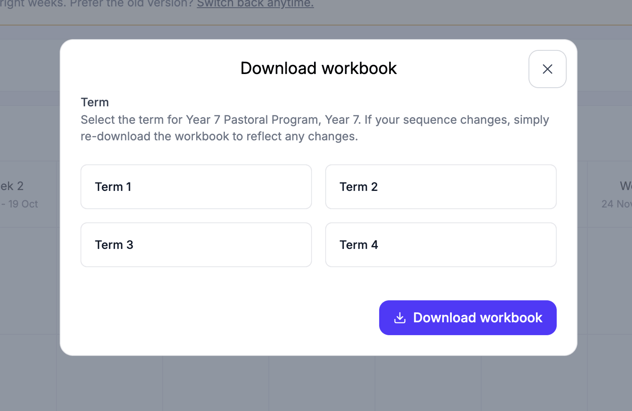
-
Click Download Workbook.
Your PDF will open in a new tab and start downloading automatically.
⚠️ Important: Once a Workbook is generated, the lessons in that sequence and term are locked to their current version. This ensures the PDF stays aligned with what students are seeing in class.
Any future updates to those lessons won't be reflected for students until you re-download the workbook.
What if I add a class to that sequence later?
-
If a new class is added to the sequence later, lessons won’t be locked for them unless you re-download the workbook.
-
If a class is moved to a different sequence that shares these lessons, the lessons remain locked to the original versions from when the workbook was downloaded.
Can I edit the Workbook before printing?
Currently, workbooks are not editable.
Need individual worksheets for a lesson?
You can also download worksheets one-by-one from the Lesson's Prepare page. Learn more here: How to Use Lesson Worksheets