
Steps to move a student:
-
Navigate to the class the student is currently enrolled in.
-
Click the ⋮ menu in the top right, then select Manage students:

-
Locate the student’s name in the list.
-
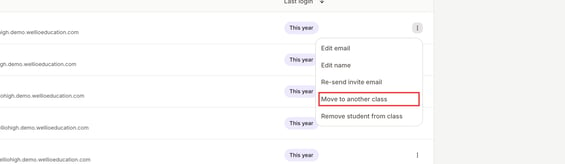
Click the ⋮ menu next to their name.
-
Select Move to another class:
-
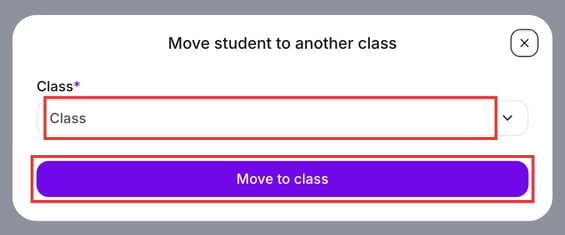
From the Class dropdown, choose the new class. The dropdown only shows classes in the student's current year level.
-
Click Move to class to confirm the transfer.
Need to move a student to a different year?
A student's year level comes from their class. Because Move to another class only lists classes in the same year, use these steps instead:
- Open the class the student is in now, click the ⋮ menu in the top right and select Manage students.
- Click the ⋮ menu next to their name and select Remove student from class.
- Open the class for the new year level, click the ⋮ menu and select Manage students.
- Click Add students, then Add by email, and start typing the student's name to add them.
Can't see a class for the new year level? Ask your Wellio admin to create one (see Create a class).