---
title: How to Set up a Survey
description: Insights provide schools with a comprehensive view of student wellbeing, across a variety of social, emotional, physical, and environmental factors. Regular assessments help identify trends, uncover issues, and track progress over time
---
[Skip to content](https://help.wellioeducation.com/how-to-create-a-survey#main-content)
English
Show submenu for translations
[](https://www.wellioeducation.com)
Open main navigation
Close main navigation
- English
Show submenu for translations
- [Sign In](https://app.wellioeducation.com/)
[Sign In](https://app.wellioeducation.com/)
Hello. How can we help you?
- There are no suggestions because the search field is empty.
1. [Help Centre](https://help.wellioeducation.com/?hsLang=en)
2. [Insights](https://help.wellioeducation.com/insights?hsLang=en)
3. [Surveys](https://help.wellioeducation.com/insights?hsLang=en#surveys)
# How to Set up a Survey
## Insights provide schools with a comprehensive view of student wellbeing, across a variety of social, emotional, physical, and environmental factors. Regular assessments help identify trends, uncover issues, and track progress over time
Integrating tools like the[Wellbeing Skills Index](https://help.wellioeducation.com/how-to-create-a-survey#survey-types) or [School Climate Index](https://help.wellioeducation.com/how-to-create-a-survey#survey-types) into your wellbeing strategy helps create an environment of proactivity: where students feel supported and able to thrive academically, socially, and emotionally. By reviewing aggregated data and individual responses schools can:
- **Identify at-risk students** early for targeted interventions.
- **Uncover trends** and areas of strength and opportunity for improvement.
- **Monitor the effectiveness** of existing wellbeing programs and policies.
- **Tailor support** to individual or group needs based on data-driven insights.
**Glossary of Key Terms**
- [**Baseline Survey:**](https://help.wellioeducation.com/how-to-create-a-survey?hsLang=en#survey-types) A comprehensive survey conducted once or twice a year.
- **[Trend Survey:](https://help.wellioeducation.com/how-to-create-a-survey?hsLang=en#survey-types)** A shorter follow-up survey analysing specific targeted factors.
- **[Wellbeing Factor:](https://help.wellioeducation.com/how-to-create-a-survey#Factors)** A specific category or theme that serves as a key driver of wellbeing.
- [**Favourability Percentage:**](https://help.wellioeducation.com/how-survey-results-are-calculated?hsLang=en#score-calculation) The percentage of students that responded favourably to a question (answering either “Agree” or “Strongly Agree”).
- **[Index Score](https://help.wellioeducation.com/how-survey-results-are-calculated?hsLang=en#index-score):** A single percentage summarising overall results across all respondents.
- **[Factor Score:](https://help.wellioeducation.com/how-survey-results-are-calculated?hsLang=en#factor-score)** The average favourability percentage for all questions linked to the factor.
Don't fancy reading, watch the demo video instead:
#### **Key Steps:**
1. [Create a New Survey](https://help.wellioeducation.com/how-to-create-a-survey#create-survey)
1. [Survey Types & Templates](https://help.wellioeducation.com/how-to-create-a-survey#survey-types)
2. [Select Dates to Run Survey](https://help.wellioeducation.com/how-to-create-a-survey#select-survey-date)
3. [Select Participant Year Levels](https://help.wellioeducation.com/how-to-create-a-survey#select-survey-year-level)
4. [Review and Publish](https://help.wellioeducation.com/how-to-create-a-survey#review-survey)
2. [Monitor Student Participation](https://help.wellioeducation.com/how-to-create-a-survey#survey-tracking)
1. [Remind Teachers to Run the Survey](https://help.wellioeducation.com/how-to-create-a-survey#email-reminder)
2. [Extend a Survey](https://help.wellioeducation.com/how-to-create-a-survey#edit-survey)
3. [Closing a Survey](https://help.wellioeducation.com/how-to-create-a-survey#close-survey)
Use these insights to update your sequences and address identified wellbeing needs and opportunities in your school.
**For guidance on viewing your report and interpreting your results**, check out the [Viewing and Interpreting your Survey Report](https://help.wellioeducation.com/understanding-survey-insights?hsLang=en) guide.
**To deep-dive into how each result is calculated**, check out the [How Survey Results Are Calculated](https://help.wellioeducation.com/how-survey-results-are-calculated?hsLang=en) guide.
**For guidance on editing an existing sequence or building a new one**, check out the [How to Build a Sequence](https://help.wellioeducation.com/how-to-build-a-sequence?hsLang=en) and [How to Edit an Existing Sequence](https://help.wellioeducation.com/edit-an-existing-sequence?hsLang=en) guides.
### Step 1: Create a New Survey
1. Navigate to the ***Insights -\>*** ***Surveys*** tab at the top of your screen
2. Click the ***Create Survey*** button
**💡 Planning your term?** You can also start a survey from the sequence calendar.
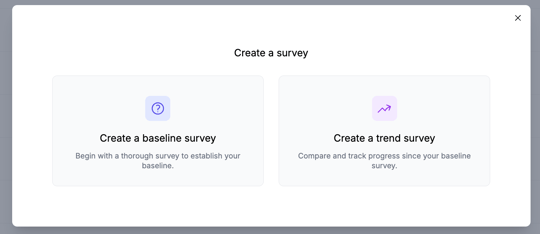
1. Choose your survey type from the following options:
1. **Baseline**: provides you with a comprehensive, high-level view of student wellbeing, to establish your baseline and highlight opportunities for improvement and action. **This should be the first survey you run for the year!**
2. **Trend**: allows you to focus on specific factors selected from the original baseline survey, making it easier to monitor improvements and impact of interventions and changes over time.
2. Choose your survey template from the following options:
1. **Wellbeing Skills Index**: A comprehensive survey that measures students’ proactive wellbeing skills. The results will help identify key areas of strength and opportunities for support.
2. **School Climate Index**: Measures students’ perceptions of their school experience. The results will help identify themes and environmental factors that may be affecting your school’s climate.
3. If you're creating a *Trend* survey, select 1-3 specific [factors](https://help.wellioeducation.com/how-survey-results-are-calculated?hsLang=en#Factors) from the template that you’d like to focus on:
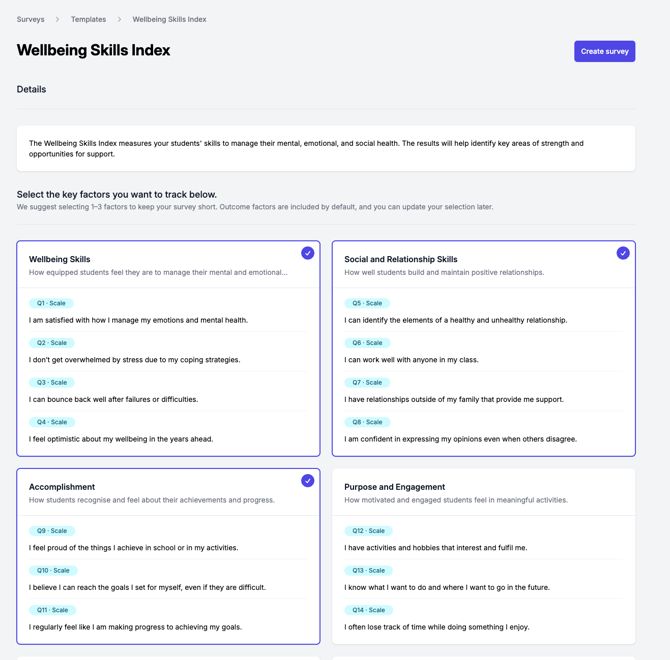
4. Once you’ve confirmed you’d like to use these questions, click ***Use Template*** (for *Baseline*) or ***Create Survey*** (for *Trend*).
### Step 2: Select Dates to Run Survey
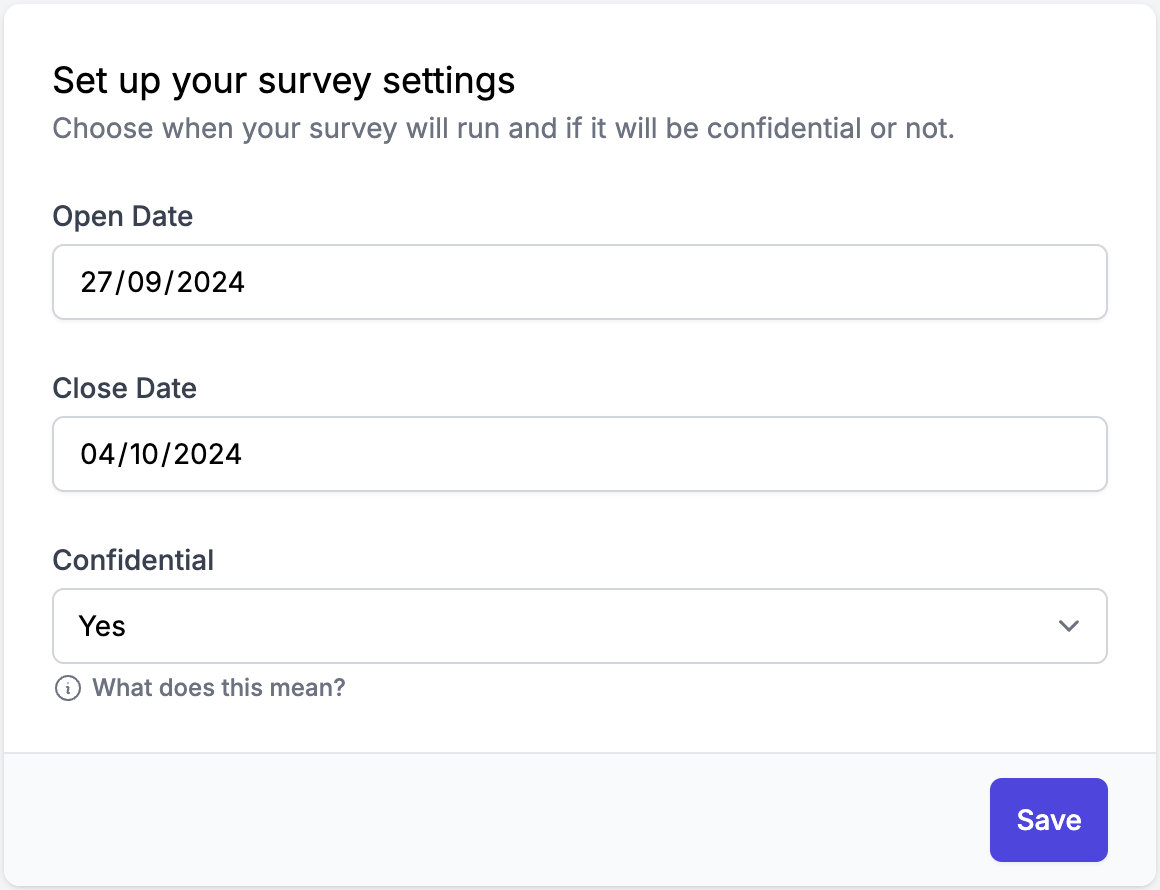
Choose the ***Open*** and ***Close*** dates for your survey to determine when it will be available for students to complete.
Choose if you'd like survey results to be confidential (default) or not.
- **Confidential (default):** Responses are anonymous and tracked by year level and class for aggregated analysis. Individual student responses will not be visible.
- **Non-Confidential:** Responses are linked to student profiles, allowing for detailed individual analysis and follow-up. Teachers also see a breakdown of their class's answers on the survey's ***Review*** tab.
### 
### Step 3: Select Participant Year Levels
Target specific student groups and ensure the survey reaches the intended participants.
1. From the drop-down menu, select the year levels you’d like to participate in the survey.
2. You’ll see the total number of students that will receive the survey.

### Final Step: Review and Publish
Before publishing, a confirmation pop-up will appear, showing participant totals, when the survey will go live and when it is set to close.

**Note:** If students have already completed the survey, it will be indicated on the confirmation page.
- If everything looks correct, click ***Publish***.
- To save a draft, ensure all fields in the *Settings* and *Participants* tabs are filled in. Click ***Save***, and your draft will be available on the *Surveys* page.
### Tracking Responses & Student Participation
Once the survey is live, teachers run it in class during a lesson. An open survey shows up under **This week** on each class page, just like a lesson, and teachers can [present it to their class](https://help.wellioeducation.com/running-a-wellio-survey-in-class?hsLang=en). Students and teachers will be alerted directly when they log in to Wellio. Students [earn XP](https://help.wellioeducation.com/xp-points?hsLang=en) for completing surveys. At most schools, students aren't emailed when the survey opens. Insights-only schools still email students.

#### Reminding Teachers to Run the Survey
If some students haven’t started the survey before the closing date, you can remind their teachers to run it in class:
1. Navigate to the survey page and open the ***Responses*** tab.
2. Click ***Remind teachers.***
3. Wellio emails the teachers of every class that still has students who haven’t started. The email links straight to the survey’s prepare page, so they can run it with their class.
Once your survey is complete, you can easily [view and analyse the survey results](https://help.wellioeducation.com/understanding-survey-insights?hsLang=en) to gain insights into student responses.
#### Extend a Survey
If you'd like to extend the ***Close* *date*** on a published survey to give students more time to complete it, navigate to the survey in question and select the ***Extend*** button. See [How to extend a survey deadline](https://help.wellioeducation.com/how-to-extend-a-survey-deadline?hsLang=en).


**⚠️ Important:** After making changes, you'll need to click ***Review & Republish*** for the survey tobecome available for students again.
#### Closing a Survey
To close a survey earlier than the original set time:
1. Navigate to the survey page.
2. Click ***Edit Survey*** and confirm***:
***
3. Edit the ***Close Date*** to 1-minute in the future e.g. if it is 4:00pm, set this to 4:01pm for today's date:
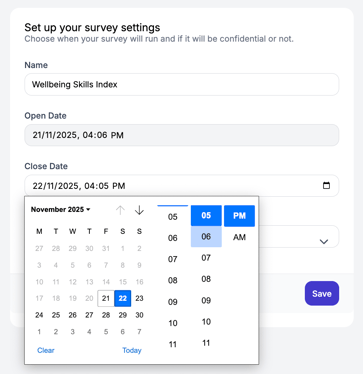
4. Click ***Save*** and ***Review & Publish.***
If you no longer need the survey, check out our help article for [Archiving a Survey](https://help.wellioeducation.com/how-do-i-archive-a-survey?hsLang=en).
- [Getting Started](https://help.wellioeducation.com/getting-started?hsLang=en#main-content)
- [Getting started as a teacher](https://help.wellioeducation.com/getting-started?hsLang=en#getting-started-as-a-teacher)
- [Getting students started](https://help.wellioeducation.com/getting-started?hsLang=en#getting-students-started)
- [IT Setup](https://help.wellioeducation.com/it-setup?hsLang=en#main-content)
- [SSO](https://help.wellioeducation.com/it-setup?hsLang=en#sso)
- [Whitelisting](https://help.wellioeducation.com/it-setup?hsLang=en#whitelisting)
- [Teacher & Class Enrolments](https://help.wellioeducation.com/it-setup?hsLang=en#teacher-class-enrolments)
- [For Admins](https://help.wellioeducation.com/for-admins?hsLang=en#main-content)
- [IT Setup](https://help.wellioeducation.com/for-admins?hsLang=en#it-setup)
- [Onboarding](https://help.wellioeducation.com/for-admins?hsLang=en#onboarding)
- [Planning your sequences](https://help.wellioeducation.com/for-admins?hsLang=en#planning-your-sequences)
- [Managing accounts](https://help.wellioeducation.com/for-admins?hsLang=en#managing-accounts)
- [Planning Your Sequence](https://help.wellioeducation.com/for-admins?hsLang=en#planning-your-sequence)
- [Lesson Tools & Delivery](https://help.wellioeducation.com/lesson-tools-delivery?hsLang=en#main-content)
- [Delivering a lesson](https://help.wellioeducation.com/lesson-tools-delivery?hsLang=en#delivering-a-lesson)
- [Editing content](https://help.wellioeducation.com/lesson-tools-delivery?hsLang=en#editing-content)
- [For Students](https://help.wellioeducation.com/for-students?hsLang=en)
- [Insights](https://help.wellioeducation.com/insights?hsLang=en#main-content)
- [Activity Dashboard](https://help.wellioeducation.com/insights?hsLang=en#activity-dashboard)
- [Surveys](https://help.wellioeducation.com/insights?hsLang=en#surveys)
- [Student Profiles](https://help.wellioeducation.com/insights?hsLang=en#student-profiles)
- [Articles For Teachers](https://help.wellioeducation.com/articles-for-teachers?hsLang=en)
- [Troubleshooting & Help](https://help.wellioeducation.com/troubleshooting-help?hsLang=en)
- [Teacher and Class Enrolment](https://help.wellioeducation.com/teacher-and-class-enrolment?hsLang=en)
- [Parent Webinars](https://help.wellioeducation.com/parent-webinars?hsLang=en)
- [Knowledge](https://help.wellioeducation.com/knowledge?hsLang=en#main-content)
- [Professional Learning Resources for Schools](https://help.wellioeducation.com/knowledge?hsLang=en#professional-learning-resources-for-schools)
[](https://www.wellioeducation.com)
Teach wellbeing with confidence.
Copyright © 2026, Wellio