
How to access your school's Wellio parent login info
As an Admin, you can find the parent login inside your Wellio account.
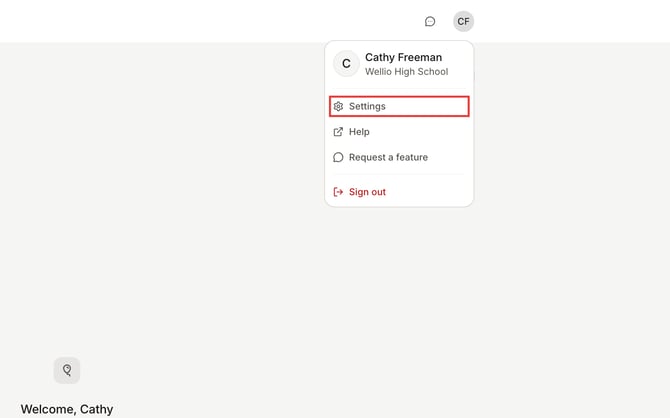
- Click your profile picture in the top-right corner, then Settings. Choose School from the Settings menu.
- Copy the Email under the Parents section using its copy button.
- Share the login details with your families, for example in your school newsletter or on your parent portal.
Note: The parent login only shows the lessons your school teaches this year. Parents can't see your classes, your students or any student answers. Every family uses the same login, and many parents can be signed in at once.
What can parents see?
Once they sign in, parents see the lesson sequences your school teaches this year. They can open a sequence to see its lessons grouped by term, and open a lesson to look through its slides and overview.
Staff training, professional learning lessons and lessons that aren't included in your subscription are never shown to parents.
Share Accessing Wellio as a parent with families along with the login details.
I can't see the parent login details
Most schools already have a parent account, because it's created automatically when your subscription starts. If the Parents section shows a Create parent account button instead:
- Go to Settings, then School.
- Under Parents, click Create parent account.
- The email will appear. Copy it and share it with your families.
How do I delete the parent account?
Admins can delete the account if your school doesn't want parents to have access.
- Go to Settings, then School.
- Under Parents, click Delete account, then confirm.
The deletion stays in place when your school's subscription renews. To restore access, recreate the account from the same page with one click. Share the updated details with your families.
Tip: The same page also shows your school's relief teacher (CRT) login. See Sharing Wellio Access with Relief Teachers.